Over 90% of all cyberattacks are associated with phishing attacks. It’s no surprise these attacks are one of the most common and persistent threats individuals and businesses face daily. They rely on social engineering, which uses human behavior and trust to trick people into giving up passwords or other sensitive information. However, as time passes, more people have learned to spot these attacks and avoid them. This is a good thing, until attackers evolve and create new methods of social engineering like ClickFix attacks.
In just the last year, ClickFix attacks have surged by over 500%, landing in second place as the most common cyberattack behind phishing attacks. Instead of relying on a malicious attachment or guessed password, ClickFix attacks trick you into launching the attack yourself.
What Are ClickFix Attacks?
ClickFix attacks were estimated to be first documented in March 2024, and since then they have grown at a massive rate. ClickFix attacks are a social engineering attack that relies on users executing a malicious command, usually from a malicious pop-up or phishing email.
Imagine you go to a website and everything seems normal. It looks like one you’ve visited before and you sign in, but now a pop-up appears and asks you to follow steps to be verified. Or it may say your computer is infected, and you need to follow steps to fix it. In both examples, they are tricking the user into taking a malicious action under the guise that it would fix the “problem” that has appeared. That fake promise of an easy ‘fix’ is what gives ClickFix attacks their name.

Examples of ClickFix Attacks
Photo by keep aware
In these examples, users are asked to copy a string of code and paste it. No legitimate pop-up would ever ask a user to paste code to fix an issue, so you should never follow these types of instructions from an unexpected web page. Websites aren’t the only place these attacks appear. In other instances, ClickFix attacks can also reach users through phishing and malicious ads.
Other Types of ClickFix Attacks
ClickFix attacks do not only appear as fake CAPTCHA prompts on suspicious websites. Cybercriminals are using several different ways to get these fake “fixes” in front of users.
- Phishing attacks: An email may contain a link or attachment that leads to a fake error message or verification page. From there, the user is given instructions that actually run malicious code on their computer. Microsoft has observed ClickFix campaigns delivered this way.
- Malicious ads and pop-ups: Attackers can create ads that appear to promote legitimate software, updates, or services. Clicking one may send the user to a copycat website containing a ClickFix prompt. Microsoft has documented malicious ads appearing when users search for software and updates.
- Search results and compromised websites: ClickFix attacks can also appear when someone visits a malicious website or a legitimate website that has been compromised. Attackers may even use advertising or search manipulation to make these pages easier to find.
The common thread is social engineering. Whether the attack starts with an email, an ad, or a website, the goal is to convince the user that following the instructions is safe.
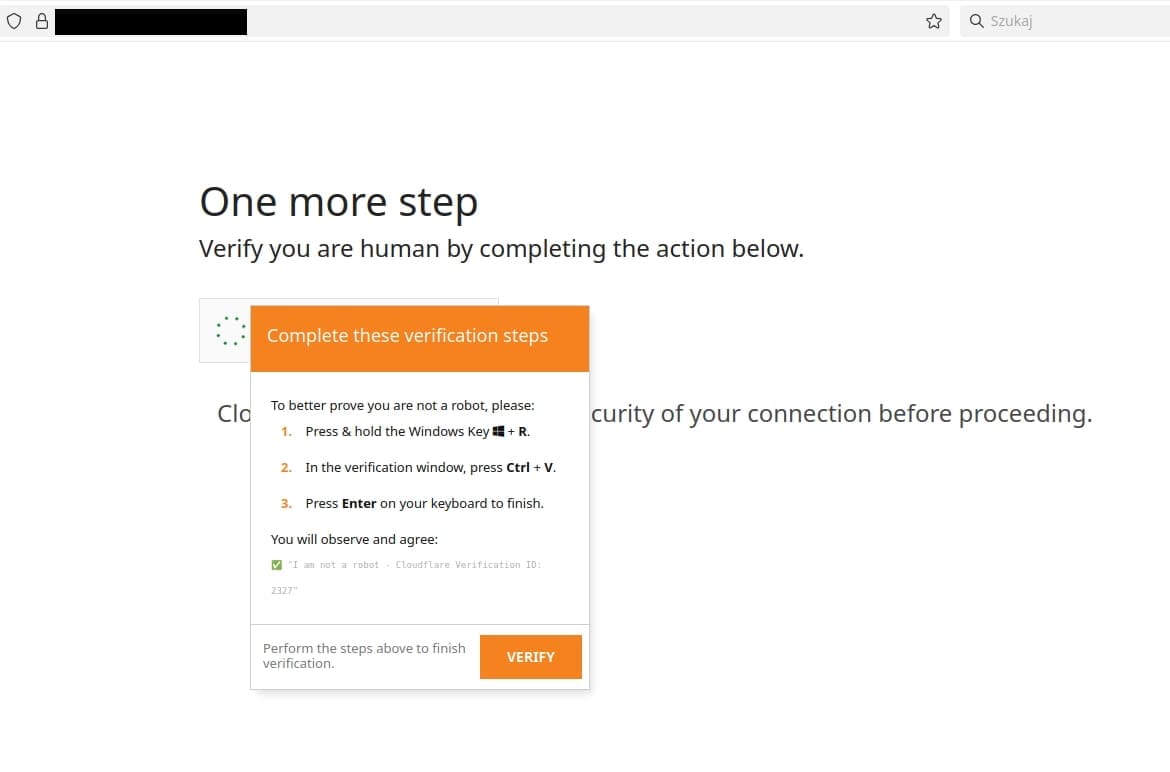
Photo by cert.pl
How Businesses Can Prevent ClickFix Attacks
Because ClickFix relies on convincing employees to perform the malicious action themselves, prevention requires both employee awareness and strong technical safeguards.
Businesses can reduce their risk by focusing on a few key areas:
- Update security awareness training: Teach employees that legitimate CAPTCHAs, browser updates, and support pages should not ask them to copy and run commands on their computer.
- Strengthen email and web protection: Filtering suspicious emails, blocking malicious websites, and checking links can help stop ClickFix attacks before they reach employees.
- Use endpoint security: Endpoint detection and response tools can help identify and stop suspicious activity if someone accidentally follows malicious instructions.
- Restrict unnecessary system tools: Limit access to tools commonly abused in ClickFix attacks when employees do not need them for their jobs.
- Work with an MSSP or co-managed IT and cybersecurity partner: A trusted partner can help monitor threats, manage security controls, and strengthen protections as phishing tactics continue to evolve.
ClickFix attacks show how quickly phishing tactics can change. Businesses need defenses that can change with them, combining employee awareness, strong security controls, and ongoing support to reduce the chances that one convincing prompt turns into a larger incident.
Stay Ahead of Evolving Phishing Attacks
ClickFix attacks change the conversation around phishing. The warning can no longer stop at “don’t click suspicious links.” Employees also need to recognize when a website, email, or pop-up is asking them to do something that simply does not make sense.
That makes security awareness just as important as the technology behind it. The more familiar employees are with tactics like ClickFix, the less likely an attacker is to turn a convincing prompt into a successful breach.
If your current phishing training still focuses mostly on suspicious emails and links, it may be time to update the playbook. Our team can help you build a stronger approach to cybersecurity that keeps pace with how these attacks are changing.